A sales rep is halfway through a call when the prospect asks about an implementation constraint that was never mentioned in the agenda.
There may be an answer in the product documentation. The account history may add useful context. A previous customer call might contain a similar question. The window to use any of that information is short because the conversation will continue whether the rep finds it or not.
Once the discussion has moved on, an accurate summary or a good coaching note can still help with the next call. It cannot change this one.
In-workflow AI is designed around that window. It uses what is happening during the work itself to decide whether relevant context, guidance, or an action would be useful while there is still time to use it.
Key Takeaways
- In-workflow AI operates inside an active task instead of waiting for a separate prompt or the end of the task.
- During a sales call, the conversation itself becomes an input, so the rep does not have to describe the situation before useful context can appear.
- Relevance changes as the discussion moves, which makes timing as important as accuracy.
- Restraint is part of the product. Surfacing every possible signal turns the assistant into another source of context switching.
- The rep keeps judgment and control, which matters more as systems move from surfacing information toward taking actions.
What does “in-workflow AI” mean?
In-workflow AI operates inside an active task rather than waiting for a separate prompt or the end of the task.
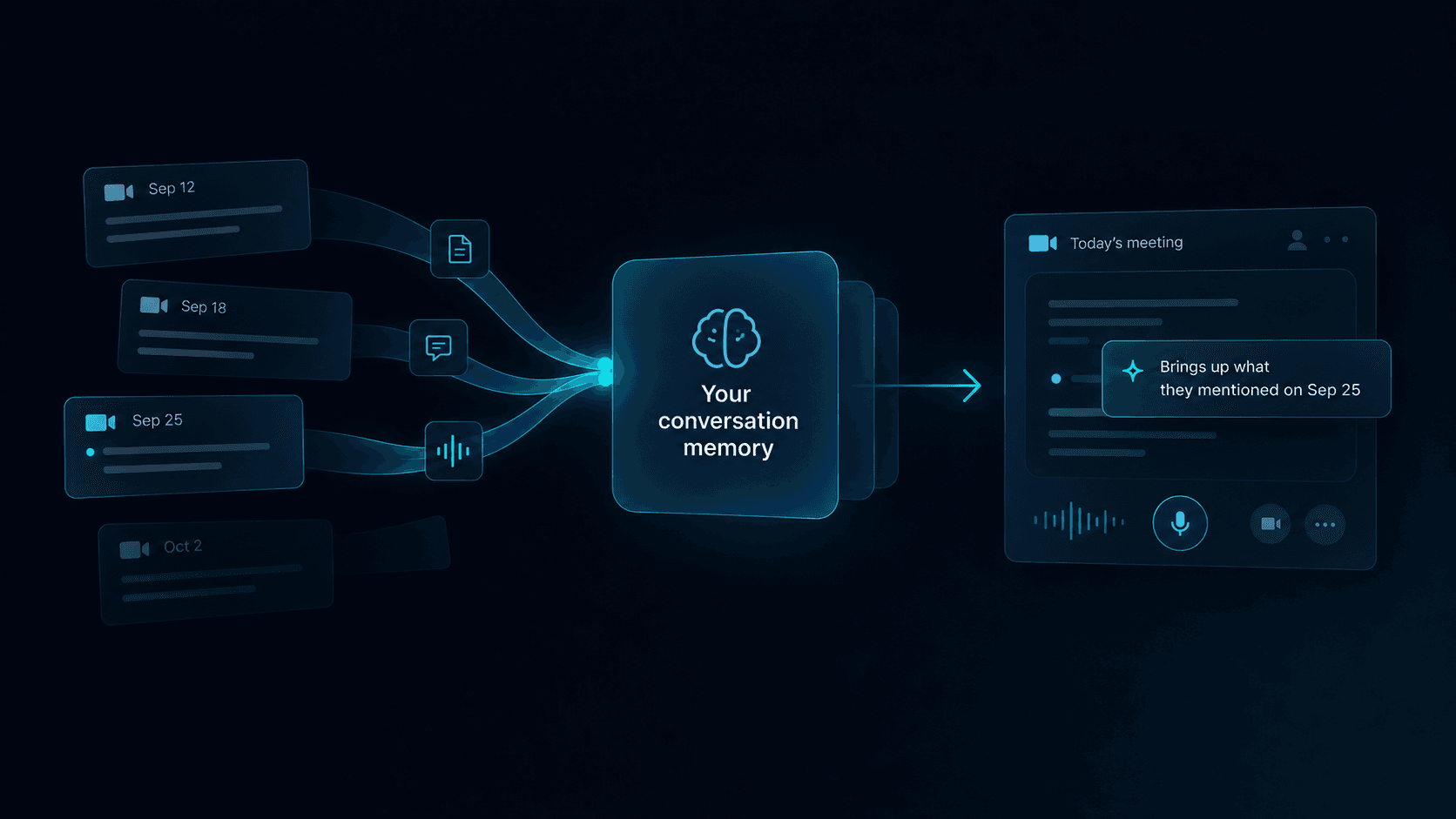
During a sales call, the conversation becomes part of the input. As the prospect raises questions, introduces constraints, or changes direction, the system can interpret those moments alongside information the company already has, such as account history, approved product information, playbooks, previous conversations, or internal policies.
Timing determines whether any of that context is useful. A prospect mentioning a competitor may make a battlecard relevant for the next thirty seconds. A pricing question might bring a specific approval rule into scope. A commitment from the previous meeting becomes useful when the prospect refers to it again.
The same information shown ten minutes earlier could be noise. Shown ten minutes later, it may be too late. In-workflow systems therefore have to account for relevance that changes as the conversation develops.
How is this different from asking an AI tool a question?
A rep can already open an AI assistant during a call and type a question.
That can make retrieval faster, but it still creates a manual sequence: notice the problem, divide attention between the call and another tool, formulate a prompt, review the response, and decide whether it applies.
In-workflow AI can use the conversation itself to remove some of those steps. If a prospect asks about a product limitation, the system already has the question. If they refer to something discussed in the last meeting, the current conversation provides the reason that previous context has become relevant again.
This also changes what the interface needs from the rep. They should not have to continuously explain what the call is about or manually initiate every search while the system sits outside the conversation.
What does in-workflow AI need to understand?
Live conversation alone is not enough.
A transcript can tell a system what words were spoken. Useful assistance depends on understanding how those words connect to the company, the account, and the current stage of the conversation.
Imagine a prospect says:
“That timeline might be difficult for our security team.”
Several interpretations are possible. It could be a minor implementation concern, a sign that another stakeholder needs to enter the buying process, a risk to the proposed launch date, or simply a comment that requires no intervention.
Useful in-workflow AI has to connect the statement with surrounding context before deciding whether anything should happen. That context may come from earlier parts of the call, previous interactions with the account, product knowledge, or the company’s own sales process.
Deciding what matters is often harder than recognizing what was said.
Relevance changes as the conversation moves
Traditional software tends to organize information around stable objects: an account, an opportunity, a contact, a document. A conversation can move through several of those contexts within a few minutes.
A discovery call might shift from business goals to implementation, then pricing, then back to an operational concern raised twenty minutes earlier. Each shift changes which information deserves attention.
Live assistance therefore cannot rely on a fixed collection of account knowledge sitting beside the transcript. When the prospect is discussing implementation, technical constraints may matter. Once the discussion moves to procurement, those details can recede while pricing, approval, and contractual information become more relevant.
Keeping that visible context narrow is part of making it usable during a call.
Sometimes the right response is no response
A system may detect dozens of potentially relevant signals during a conversation. Surfacing all of them would turn the AI itself into another source of context switching.
A familiar objection does not always need a suggested response. A product mention does not automatically justify opening documentation. A change in sentiment may be interesting without being actionable.
Before interrupting the rep, the system needs a reason. The information might help answer the current question, prevent a likely mistake, restore important account context, surface a constraint the rep may otherwise miss, or support a decision that is happening now.
Weak signals can stay in the background. Restraint is part of the product behavior, because a live interface has to protect the same attention it is trying to support.
What can in-workflow AI do during a sales call?
The most useful applications tend to sit close to moments where the rep would otherwise have to remember, search, interpret, or switch tools:
- A technical question makes an approved product explanation relevant
- A requirement from an earlier meeting returns when the prospect brings it up again
- An objection connects to an existing playbook
- A newly mentioned constraint affects a next step the team had already planned
Other work can begin more quietly in the background:
- A follow-up item is captured as it emerges
- Account context stays connected to the current discussion
- Information needed after the call starts taking shape before the conversation ends
Individually, these are small interventions. Together, they reduce the amount of mental reconstruction the rep has to do while trying to listen.
Human judgment still matters
Sales conversations contain context that is difficult to reduce to a rule.
A rep may know that a particular customer dislikes being pushed on next steps. They may recognize that a question is exploratory rather than an objection. They may intentionally leave a concern unresolved because another stakeholder needs to join the discussion.
An AI system can surface information without understanding every nuance behind the rep’s choice, so useful live assistance needs to leave room for judgment. Suggestions can be ignored, context can be read without being acted on, and a proposed next step can remain a proposal.
The rep remains responsible for the conversation. As systems move from surfacing information toward taking actions inside business workflows, control becomes increasingly important. The closer an action gets to affecting a customer, a record, or a commitment, the clearer approval and oversight need to be.
Where in-workflow AI fits in the sales stack
Most sales tools are organized around a particular part of the workflow.
CRM systems preserve account and opportunity information. Knowledge bases store reusable company knowledge. Call intelligence tools make conversations searchable and help teams review what happened. AI assistants can answer questions when someone asks.
In-workflow AI connects those sources to the active conversation, which means its usefulness partly depends on the systems around it. Outdated product information, incomplete account history, or conflicting internal guidance becomes more visible when retrieval gets faster.
Reliable inputs, clear permissions, and an understanding of where information came from are therefore part of the experience even if the rep never sees that complexity directly. The system also needs rules for which sources should take priority when several plausible answers exist.
How to evaluate in-workflow AI for sales
A live AI system is easy to judge by how much it can produce. More prompts, signals, summaries, and analysis can look impressive in a demo, but every additional element competes with the prospect for attention during an actual call.
A better evaluation starts with the rep’s workflow.
Watch what happens when an unexpected question comes up. See whether the rep can understand surfaced context without stopping the conversation and whether guidance regularly appears when it is unnecessary. Trust matters too: reps need to understand enough about where an answer came from to decide whether they should use it.
Timing should also be evaluated as more than raw latency. A fast suggestion delivered before enough context exists may be poorly matched to the conversation. What matters is whether the assistance arrives inside the decision window with enough information to be useful.
The interface should get quieter as the system gets better
Early AI products often demonstrate intelligence by showing their work: summaries, classifications, prompts, suggestions, scores, and alerts.
Live conversations create a different design constraint because the rep already has a primary focus in front of them: another person.
As an in-workflow system gets better at judging relevance, more of its intelligence can remain in the background. Ordinary moments can pass without intervention. When something genuinely useful changes, the system can become visible briefly and then recede again.
That creates a different picture of progress. A more capable AI does not have to produce a busier call screen. It can help create conversations with fewer searches, fewer unnecessary interruptions, and less time spent reconstructing context.
The experience can become quieter.
Where kernous Fits
kernous is built as in-workflow AI for live sales conversations. It follows the call as it happens, connects what is being discussed with the company’s product knowledge, account history, and previous conversations, and surfaces that context while the rep can still act on it.
The constraints described above are the ones that shape the product: judging what has become relevant, keeping the visible surface narrow, and staying quiet when nothing needs to appear.
The rep stays in control of the conversation. Surfaced context can be read, adapted, or ignored, and a proposed next step remains a proposal.
For broader product questions about kernous, see the FAQ.
FAQ
What is in-workflow AI?
In-workflow AI operates inside an active task rather than waiting for a separate prompt or for the task to finish. During a sales call, it uses the conversation itself as an input and decides whether relevant context, guidance, or an action would be useful while there is still time to use it.
How is in-workflow AI different from an AI assistant?
An AI assistant waits to be asked. The rep has to notice the problem, move attention away from the call, write a prompt, review the response, and decide whether it applies. In-workflow AI can use the live conversation to remove some of those steps, because the question and the reason it became relevant are already present in the discussion.
Is in-workflow AI the same as conversation intelligence or call recording?
No. Call recording and conversation intelligence tools mostly work after the call, making conversations searchable and helping teams review what happened. Both are useful, but they help with the next call rather than the current one. In-workflow AI is built for the window while the conversation is still open.
What can in-workflow AI do during a sales call?
It can surface an approved product answer when a technical question comes up, bring back a requirement from an earlier meeting, connect an objection to an existing playbook, or flag that a new constraint affects a planned next step. It can also capture follow-up items quietly in the background as they emerge.
How should a team evaluate in-workflow AI?
Watch the rep’s workflow rather than the volume of output. See whether an unexpected question gets useful support, whether surfaced context can be understood without stopping the conversation, how often guidance appears when it is unnecessary, and whether the rep can tell where an answer came from. Timing should be judged by whether help arrives inside the decision window, not by raw latency.