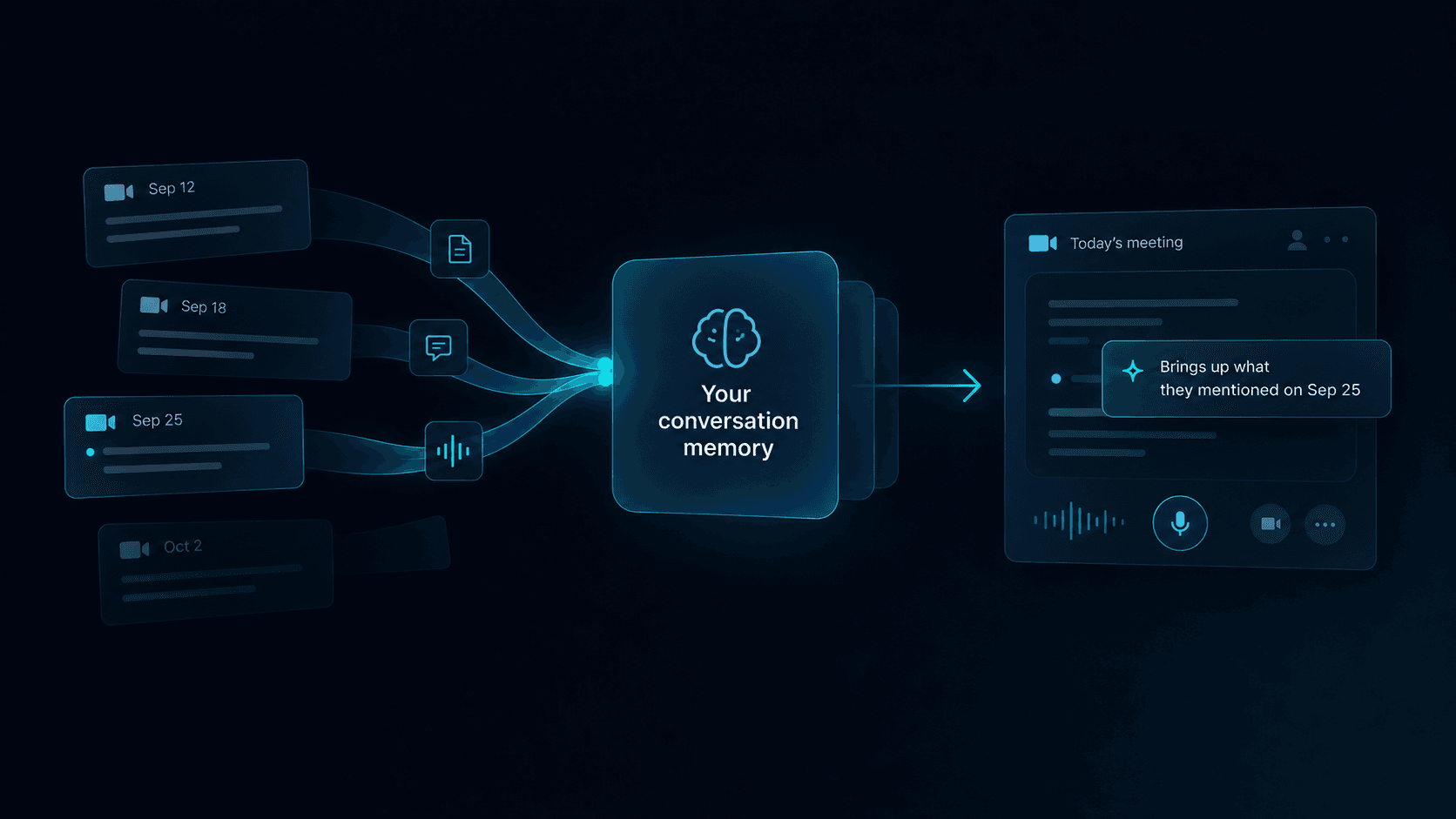
A buyer asks a detailed question in the middle of a sales call.
The answer exists somewhere. It may be in a product document, an earlier email, a CRM note, a pricing page, a call recording, or the experience of someone else on the team.
But the rep cannot find it quickly enough.
They pause. Open another tab. Search through a document. Send a message to a manager. Give a partial answer. Or promise to follow up later.
The information was available. It simply was not available at the moment it mattered.
Real-time help during sales calls should solve that gap. It should make the right context easier to access without pulling the rep away from the buyer or turning the conversation into a scripted interaction.
Key Takeaways
- Sales reps usually do not need more information during a call. They need faster access to the right information.
- Searching through several tools creates pauses, breaks attention, and makes the buyer repeat context.
- Good live-call assistance should retrieve relevant, approved information without overwhelming the rep.
- Preparation is still necessary, but no preparation process can predict every direction a conversation may take.
- Real-time support should assist the rep’s judgment, not replace it.
Why Finding Information During a Call Is So Difficult
Sales teams rarely have a complete absence of knowledge.
They usually have the opposite problem.
Information is distributed across:
- CRM records
- Internal documents
- Product pages
- Pricing and packaging files
- Previous emails
- Meeting notes
- Call recordings
- Enablement libraries
- Team messages
- The memory of managers and experienced reps
Each source may be useful on its own. The difficulty appears when the rep needs to connect them while a live conversation is moving.
A buyer may ask:
How is this different from the process we use today?
Can this support the workflow we discussed last month?
What happens if our team needs a different permission structure?
Is this included in the current plan?
Who on our side would need to be involved in implementation?
The rep has only a few seconds to decide:
- What exactly is the buyer asking?
- Which source contains the answer?
- Is that source current and approved?
- How much detail is useful right now?
- Should the rep answer, clarify, or follow up?
That is not only a search problem. It is a context problem.
The Cost of Leaving the Conversation to Search
Looking something up during a call is not automatically bad.
A short pause can be better than giving an inaccurate answer. Buyers generally understand that a rep will not know everything from memory.
The problem is what happens when searching becomes the workflow.
The rep stops listening
Attention shifts from the buyer to tabs, documents, messages, and search results.
The rep may find the answer but miss the next part of the buyer’s question.
The buyer has to wait
Even a short pause feels longer when there is no explanation.
The buyer may simplify the question, change the subject, or decide the answer is not important enough to pursue.
Context gets lost
A search tool may return information that matches the words in the question but not the situation behind it.
For example, the buyer asks about onboarding. The right answer may depend on their team size, plan, existing workflow, or something discussed earlier in the call.
The rep gives the safest generic answer
When the exact information is difficult to find, reps often fall back on broad language:
It should be possible.
I think that is included.
We can probably support that.
These answers keep the conversation moving, but they create uncertainty and extra follow-up later.
The call becomes fragmented
A conversation that should feel connected turns into a series of stops:
- Ask a question
- Search
- Give a partial answer
- Return to discovery
- Search again
- Promise follow-up
The buyer experiences the team’s internal information structure instead of a coherent conversation.
Preparation Helps, but It Cannot Predict Every Turn
A strong preparation process reduces unnecessary searching.
Before a call, the rep should review:
- Who they are speaking with
- What has already been discussed
- The likely purpose of the call
- Relevant product or account information
- Open questions from the last conversation
- The next decision the buyer may need to make
A practical sales call preparation guide can help organize this work.
But preparation has a limit.
A buyer may introduce:
- A new stakeholder
- A use case that was not mentioned before
- A concern triggered by something said during the call
- A detailed technical or operational question
- A comparison the rep did not expect
- Context from an earlier conversation the rep did not attend
The goal of preparation is not to predict every possible question.
It is to enter the call with enough context to listen well—and to make the rest of the team’s knowledge accessible when the conversation goes somewhere new.
What Information Do Reps Need in the Moment?
Not every piece of sales content needs to appear during a call.
The most useful information usually falls into a few categories.
Account context
This includes:
- Previous conversations
- Earlier objections
- Stakeholder roles
- Known priorities
- Open questions
- Commitments already made
- Relevant CRM notes
Account context prevents the buyer from having to repeat information and helps the rep understand why a question matters.
Product knowledge
This may include:
- Feature details
- Supported workflows
- Integrations
- Permissions
- Limitations
- Implementation requirements
- Security or compliance information
The useful answer is rarely an entire product document. It is the specific part that responds to the buyer’s current question.
Pricing and packaging
Reps may need to confirm:
- What is included in a plan
- How pricing changes with team size or usage
- Whether a capability requires an add-on
- What information is still needed before quoting accurately
Pricing information must be current. An outdated answer is often worse than no immediate answer.
Approved guidance
Teams may have preferred language for:
- Common objections
- Sensitive product limitations
- Security questions
- Competitive questions
- Legal or compliance boundaries
- Claims a rep should not make
This guidance should support the rep’s response without forcing every conversation into the same script.
Conversation cues
Sometimes the rep does not need a factual answer.
They need help noticing what just happened:
- A stakeholder was mentioned
- The buyer described a deadline
- A concern was not fully answered
- The conversation moved away from the original problem
- A next-step condition became clear
In these moments, the most useful support may be a reminder to clarify or follow up.
What Real-Time Help During Sales Calls Should Actually Do
Real-time assistance is useful only when it reduces effort without adding a new distraction.
A good system should do five things.
1. Understand the Current Question
Matching a keyword is not enough.
Consider this question:
Can we control who sees the information?
The right answer depends on what “information” refers to, who “we” means, and what workflow the buyer is describing.
Useful assistance should consider:
- The words spoken now
- The topic already being discussed
- Relevant account context
- Earlier parts of the conversation
- The type of information the buyer is asking about
Without that context, the system may retrieve something technically related but practically useless.
2. Retrieve From Approved Sources
The rep should know where the answer came from.
Useful sources may include:
- Current product documentation
- Approved sales materials
- Account notes
- Internal knowledge bases
- Pricing references
- Implementation guidance
The system should not combine uncertain information into a confident answer without showing its basis.
When the source is unclear or the answer is incomplete, the rep should be able to say so.
3. Surface the Smallest Useful Answer
A live call is not the right place to read a full document.
The rep usually needs:
- A concise answer
- The relevant limitation
- One supporting detail
- A link or source for deeper review
Showing too much creates another search problem inside the assistance tool.
The best answer is not the longest answer. It is the smallest amount of context that helps the rep respond accurately and stay present.
4. Appear at the Right Moment
Not every relevant piece of information should interrupt the rep.
Some information is valuable but not urgent. It can wait until after the call.
Real-time support should prioritize information that is:
- Directly related to the current question
- Useful before the topic changes
- Difficult to recall accurately
- Important enough to affect the buyer’s understanding
- Safe to use in the current context
A low-value reminder can be more distracting than helpful.
5. Leave the Rep in Control
The rep should decide:
- Whether to use the information
- How to explain it
- Whether to ask a follow-up question
- Whether the answer fits the buyer’s situation
- When to say that more confirmation is needed
Real-time assistance should not turn the rep into a reader of generated answers.
The rep still owns the judgment, tone, and relationship.
An Example: From Search Disruption to Live Context
This fictional example uses invented plan details to illustrate a document lookup during a sales call.
A buyer asks whether single sign-on is included in the plan on their quote. You remember that your company offers SSO, but you cannot remember which plan includes it.
You open the pricing folder, switch between two PDFs, and scan the comparison rows while the buyer waits. Your attention moves away from what they are saying and into the documents.
With useful live retrieval, the relevant comparison row is at hand during that same exchange. It lists SSO as included in the Team plan. You compare it with the buyer’s quote: Team is the plan they have been offered.
Before answering, you check the document’s date and the terms on the quote. The document is current, and the quote contains no exception affecting SSO. You can now confirm that SSO is included, in your own words, while the question is still part of the conversation.
The buyer has a clear answer. You have checked the information behind it and can return your attention to the discussion.
When the Best Answer Is Another Question
Not every buyer question should be answered immediately.
Sometimes the question is too broad:
Does this work for enterprise teams?
A generic yes-or-no answer may not be useful.
The rep may need to clarify:
Which part of the enterprise workflow are you most concerned about—permissions, rollout, security, or something else?
Real-time assistance can help by identifying the missing context rather than generating a broad response.
This is especially important during discovery.
A useful discovery call script gives the rep language for opening, following up, summarizing, and moving toward a next step. Live information support should strengthen that process, not replace it with automatic answers.
Real-Time Assistance Is Not the Same as Post-Call Analysis
Many sales tools help after the call.
They can produce:
- Transcripts
- Summaries
- Action items
- Coaching feedback
- Topic analysis
- CRM updates
These outputs are useful, but they do not solve the same problem.
Post-call analysis asks:
What happened, and what should we learn from it?
Real-time assistance asks:
What context does the rep need before the conversation moves on?
Both can support better sales conversations, but the timing changes the job.
For the broader question of what useful live guidance should do — beyond retrieving a specific answer while the customer is waiting — see real-time sales coaching. And when the information a rep finds is not enough to answer confidently, the next skill is knowing whether to clarify, verify, or follow up — covered in how to handle questions you can’t answer during a sales call.
How to Evaluate a Live-Call Assistance Tool
When evaluating a tool, do not look only at how much information it can generate.
Ask whether it improves the actual conversation.
Can it use your existing knowledge?
A useful tool should work with the information your team already trusts.
If it requires rebuilding every piece of knowledge in a separate system, adoption becomes difficult and answers may drift from the source material.
Does it show where information came from?
The rep should be able to distinguish:
- Approved information
- Account-specific context
- A suggested interpretation
- Something that still needs confirmation
Source visibility supports trust and better judgment.
Can the rep understand it at a glance?
The interface should not demand more attention than the question itself.
Look for concise information, clear hierarchy, and a way to open deeper context only when necessary.
Does it interrupt selectively?
More guidance does not create more value.
The tool should avoid surfacing obvious, repetitive, or low-priority information simply because it is related to the topic.
Does it fit the team’s workflow?
Consider:
- Where calls happen
- Where knowledge lives
- How account context is stored
- Who maintains approved information
- How often information changes
- What the rep is already looking at during the call
A tool that adds another isolated workflow may increase the problem it is meant to solve.
Does it preserve human judgment?
The rep should be able to ignore, adapt, or question the support.
The system should help them think with better context, not remove their responsibility for the answer.
What to Capture After the Call
Real-time support should not eliminate post-call work entirely.
The call may still produce new information that needs to be recorded:
- The buyer’s actual priority
- A new stakeholder
- An unresolved question
- A product requirement
- A decision condition
- A committed next step
- Information that should be corrected or added to the knowledge base
Good sales call notes preserve what the next conversation needs—not every sentence from the last one.
The strongest workflow connects three stages:
- Prepare with the context already known
- Access the right information while the conversation is moving
- Capture the new context for whoever continues the relationship
Each call should make the next call easier.
Where kernous Fits
kernous helps sales teams access the context they already have while a live conversation is happening.
When the topic shifts, kernous can surface relevant account history, product knowledge, approved guidance, or a useful follow-up cue without asking the rep to leave the conversation and search across several tools.
The rep remains responsible for listening, interpreting the buyer’s situation, and deciding how to respond.
kernous does not replace the conversation.
It helps make sure the context the rep needs is already there when the conversation changes.
Set Up the Context for Your Call
Add the relevant material. Add notes, PDFs, text files, or links to the customer’s record. Bring in any CRM, email, or messaging content you want to use; these systems do not sync automatically with kernous. kernous uses the material added to that record to retrieve relevant context during the call.
Check both sides of the audio. For a browser-based meeting, share the meeting tab’s audio alongside your microphone so each side arrives on its own track. Microphone-only capture records a single track: on speakerphone or in person it can capture both voices when both reach the microphone, but a handset held to your ear cannot reliably capture the customer’s side.
Use your judgment. Review the retrieved context and decide what answers the question. Check the underlying document when the answer depends on a particular version, agreement, or exception.
Bring Your Customer Context Into the Conversation
Interested in using kernous with your team? Request early access.
For product questions, explore the kernous FAQ.
FAQ
What is real-time help during sales calls?
Real-time help during sales calls is support that makes relevant account context, product knowledge, approved guidance, or follow-up cues available while the conversation is happening. Its purpose is to help the rep respond without leaving the call to search across multiple tools.
How can a sales rep find information faster during a call?
Start by centralizing approved information, keeping account notes current, and preparing the most likely context before the call. During the conversation, a live-call assistance tool can help retrieve the specific information related to the buyer’s current question.
Is it unprofessional to look up an answer during a sales call?
No. It is better to verify an answer than to give incorrect information. The problem is not the act of checking. The problem is when searching repeatedly disrupts the conversation or produces an answer without enough context.
What information is most useful during a sales call?
The most useful information usually includes account history, product details, pricing and packaging, implementation requirements, approved objection guidance, open questions, and relevant next-step conditions.
What is the difference between real-time sales assistance and sales call preparation?
Sales call preparation happens before the conversation and helps the rep review known context. Real-time assistance helps when the buyer introduces a question, concern, or direction that could not be fully predicted in advance.
Can AI help during a sales call?
AI can help retrieve relevant information, summarize approved context, or surface a useful cue while the call is happening. It should not automatically decide what the rep should say. The rep still needs to interpret the information and respond based on the buyer’s situation.
How is real-time assistance different from call transcription?
Transcription records what was said. Real-time assistance uses the current conversation to help the rep access relevant context before the moment passes. A transcript may support the process, but it does not provide the same function on its own.